IFC
If a project is running as a BIM process, exchange the data with the other project participants using the IFC format. The IFC import facilitates project work tremendously because from a single file the building model with all storeys, rooms and components is created automatically.
Important!
The focus of the IFC model is on information contained therein, and not on high quality representation. The building is visualized in three dimensions after import in DDS-CAD. The objects appear in their physical form and not as a simplified symbol. Thus, the presentation does not reflect mostly the usual norms and standards.
For the standardized representation of traditional 2D output for floor plans you can produce also DWG and DXF files.
Required conditions
- The building was modelled with classified 3D elements.
- Each object is assigned an unique identity.
- The building structure is mapped correctly, each room has been defined.
- The encapsulating objects are assigned to the rooms.
Workflow
This IFC file is usually supplied by an architect. The file contains the building with all the information about its properties and the use of the rooms. The definition of the position and rotation in the model is fixed.
By default, DDS-CAD generates its own building model for the internal technical calculations (e.g. heat load, air flow requirements) during the import.
Important!
The function uses the following quality characteristics for the IFC model:
- The building was modelled with classified 3D elements.
- Each object is assigned an unique identity.
- The building structure is mapped correctly, each room has been defined.
- The encapsulating objects are assigned to the rooms.
IFC files, which are used to coordinate the planning of different disciplines (e.g. for collision checking). The building model is not influenced. You can integrate any number of IFC files for coordination. Position, rotation and display are variable.
You can make one or more IFC objects invisible.
-
Select the IFC objects you want to hide.
 Operations
Using your mouse, you can select individual of multiple objects for editing. If you have selected objects unintentionally, you can deselect them.
Note
You can combine these operations together. To do so, press and hold

Select Objects
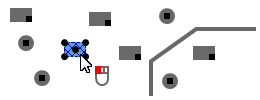
- Click
 at an object that is not selected yet. The object is selected.
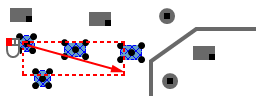
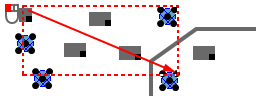
- Click and hold .
- Move the mouse to the bottom right. The cursor creates a rectangle (red dashed line).
- Release the mouse button. All touched objects are selected.
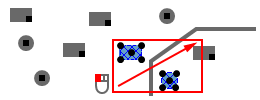
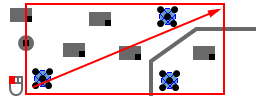
- Click and hold .
- Move your mouse to the top right. The cursor creates a rectangle (red solid line).
- Release the mouse button. All objects completely within are selected.
- Select an object of the desired type by clicking .
- Click
 . The context menu appears.
 - Select: Select Object(s) of Same Type as the One(s) Selected
- Click and hold .
- Move the mouse to the bottom right. The cursor creates a rectangle (red dashed line).
- Release the mouse button. All touched objects of a specific type are selected.
- Select an object of the desired type by clicking .
- Click . The context menu appears.
- Select: Select Object(s) of Same Type as the One(s) Selected
- Click and hold .
- Move your mouse to the top right. The cursor creates a rectangle (red solid line).
- Release the mouse button. All objects of a specific type completely within the selection window are selected.
Deselect
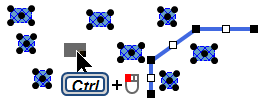
- Press and hold
- Click on a selected object. The selection is cancelled.
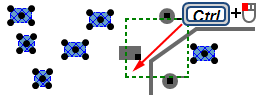
- Click and hold .
- Move the mouse to the bottom left. The cursor creates a rectangle (green dashed line).
- Release the mouse button. All objects inside or touched by the selection window are deselected.
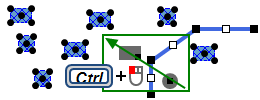
- Click and hold .
- Move the mouse to top left. The cursor creates a rectangle (green solid line).
- Release the mouse button. All objects inside the selection window are deselected.
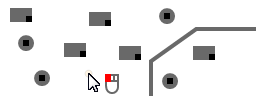
- Click somewhere in the free model space. All selections are cancelled.
- Click
- Click . The context menu appears.
- Select: Hide.
-
Start the function
Repaint .
The operation is finished.
Repaint
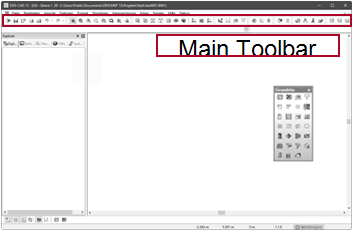
Select the function in Main Toolbar