Object-Group (Area) – Define Surface
Workflow
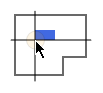
|
In the initial situation the cursor moves a single symbol. |
- Click
 . The context menu appears.
 - Select: Place Symmetrical on a Surface
 Define Surface
The cursor appears as a crosshair. The information line shows:[Click Left]=Position starting point -
Define the surface.
 Polygonal
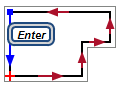
- Outline the contour from the starting point + to the last corner point
 .
. - Work counter-clockwise.
- Define the corner points by clicking
 .
. - To close the contour, press
 [Enter].
Rectangular
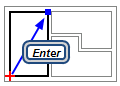
- Define the diagonal corner points by clicking .
- To complete the operation, press [Enter].
The objects are arranged in the defined surface. The dialog appears: Object-Group (Area)
- Outline the contour from the starting point + to the last corner point
- Check the settings.
 More
More - Click OK. The function remains active.
Settings, functions and parameters
Calculate type
 Manual (free placement) / Distance from objects / Objects from distance
Definition of variables and fixed parameters for the configuration of the group.
| Setting | Quantity | Distance (dX) Distance (dY) |
Effect |
|---|---|---|---|
| Manual (free placement) |

|
|
The area limits the field of objects. DDScad ignores entries that would result in exceeding the surface. |
| Distance from objects |
|

|
The larger the number of objects, the smaller the distance. |
| Objects from distance |
|
|
The greater the distance, the smaller the number of objects. |
Number of objects
In X direction / In Y direction
Number of objects in the respective direction. The release depends on the selected setting:
Calculate type
- Manual (free placement)
- Distance from objects
- Objects from distance
Important!
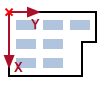
The parameters may appear reversed because the object group is aligned to the reference line of the selected surface. If you have started the contour with a line running vertically, then In X direction describes the number in perpendicular arrangement.
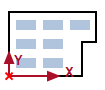
 Area
Area
Size of the defined surface. The value cannot be changed.
Quantity
Actual number of objects within the group. The value can be different from the number entered in the X and Y direction, because DDScad automatically removes the objects outside of the surface.
Placement
 Distance between
Configuration for Start point (Y)/Distance (dX).
| Setting | Effect |
|---|---|
|
|
|

|
|


Note
The parameter is available only for objects with variable size.
Show contour crosses
| Setting | Effect | |
|---|---|---|
|
|
The corner points of the surfaces are visible. |
|
| x | Start point of the operation / insertion point of the complete group | |
| x | Corner point | |
|
|
The corners of the surface are invisible | |
Start point (X) / Start point (Y)
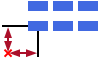
Distance between the insertion point of the complete group and the insertion point of the first object. You can also enter negative values and use different unit of lengths.
Distance (dX) / Distance (dY)
Distance between adjacent objects. Depending on the status in Distance between the value describes the distance between the insertion points or the outer edges.
Alignment
Free / Center
| Setting | Effect |
|---|---|
| Free |
|
| Center |
|