Ventilation duct – Course
Insert fitting
Example
|
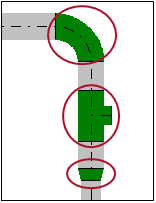
Suppose you want to use a component and configure specific settings at a particular position during the construction:
|
Workflow
- Move the duct to the position for inserting an object.
- Define a fix point by clicking
 .
. -
Select the object from the context menu (click
 ) or by using a
  keyboard key. The dialog appears.
 -
Check the settings.
Bend
 Angle
Angle
Angle of the direction change.
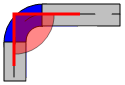
 Left / Right / Up / Down
Rotation of the bend and further direction of the duct. The setting is usually set during the definition of the duct route and also defines the angle
Rotation.Setting Example Left 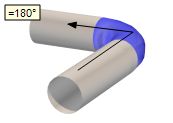
Right 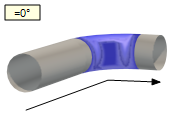
Up 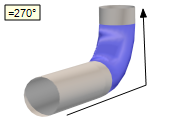
Down 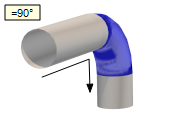 Rotation
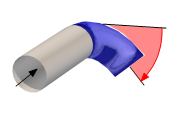
Rotation of the object in degrees (°) around the central axis of the ventilation duct. A change in the value in the positive direction causes a rotation to the right (in the drawing direction of the ventilation duct).
The value is usually set during the design of a duct system. A manual entry is required if the rotation has to deviate from the perpendicular angle.
 Angle to X-axis
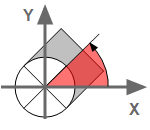
The setting only applies to objects in vertical duct segments. The rotation of the component is defined as angle. At an angle=0, the object is rotated to the right and corresponds to the position of the X-axis. A positive rotation causes the component to rotate counter clockwise.
 Tee
Straight / Branch / Main
Tee
Straight / Branch / Main
Setting Effect Straight An exit shows the selected direction. You can continue the course of the duct straight ahead.
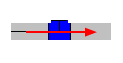
Branch An exit shows the selected direction. The duct follows the direction of the branch.

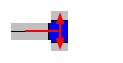
Main Two exits are on the right and left. The duct follows the branch of the selected direction.
 Angle
Angle
Angle of the branch with respect to the duct.
 Left / Right / Up / Down
The setting also defines the angle at
Rotation.Setting Exit Straight / Branch MainLeft =180°
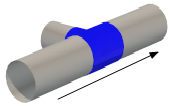
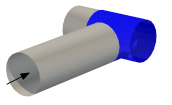
Right =0°
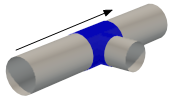
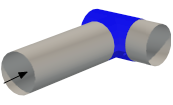
Up =270°
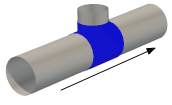
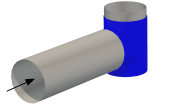
Down =90°
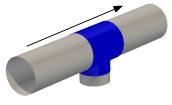
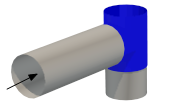 Rotation
Rotation of the object in degrees (°) around its center axis. A positive angle causes a rotation to the right (relative to the drawing direction).
The angle is automatically set with
Left / Right / Up / Down. A manual entry is required if the rotation has to deviate from the perpendicular angle.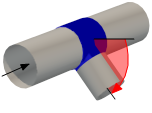 Angle to X-axis
The setting only applies to objects in vertical duct segments. The rotation of the component is defined as angle. At an angle=0, the object is rotated to the right and corresponds to the position of the X-axis. A positive rotation causes the component to rotate counter clockwise.
 Automatic Values
Setting Effect
Depending on the dimensions of the ventilation duct, DDScad calculates meaningful values for the variable parameters. 
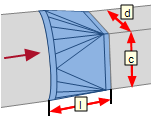
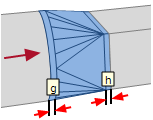
You can set the variable parameters of the object. b / a / …
The application of this setting depends on the selected product. For orientation you use the image.
Transition
Rotation
Rotation of the object in degrees (°) around the central axis of the ventilation duct. A change in the value in the positive direction causes a rotation to the right (in the drawing direction of the ventilation duct).
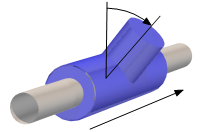 Angle to X-axis
The setting only applies to objects in vertical duct segments. The rotation of the component is defined as angle. At an angle=0, the object is rotated to the right and corresponds to the position of the X-axis. A positive rotation causes the component to rotate counter clockwise.
c
Setting Effect
At the exit you can continue with a rectangular duct.
c corresponds to the height.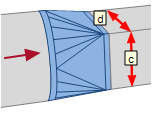
At the exit you can continue with a round duct.
d corresponds to the diameter.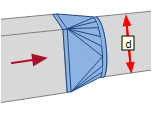 Horizontal alignment
Setting e
Left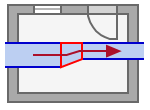
0 
>0  Center
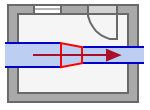 Right
Right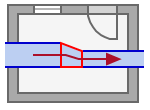
0 
>0  Vertical alignment
Setting f
Up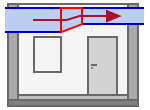
0
>0
Center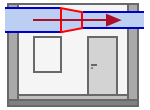 Down
Down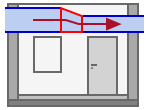
0
>0
- Click OK. The object is a part of the duct network. It defines the direction and characteristics of the continuing duct at the exit of the object.

 [B]
[B]